CLI (orchcli)
OrchCLI is a Go-based command-line tool that streamlines local development, testing, and contribution workflows for the KubeOrch platform. It manages Docker Compose environments, repository cloning, dependency installation, and service orchestration.
Tech Stack
Section titled “Tech Stack”| Component | Technology |
|---|---|
| Language | Go 1.22+ |
| CLI Framework | Cobra |
| Config Locking | gofrs/flock |
| Distribution | NPM (@kubeorch/cli), Go install, shell script |
| Orchestration | Docker Compose |
| Database | MongoDB 8.0 (via Docker) |
Project Structure
Section titled “Project Structure”cli/├── main.go # Entry point├── cmd/ # Cobra command definitions│ ├── root.go # Root command + version info│ ├── init.go # Initialize environment (clone repos, install deps)│ ├── start.go # Start services (auto-detects mode)│ ├── stop.go # Stop services│ ├── restart.go # Restart services│ ├── logs.go # View service logs│ ├── status.go # Check service health│ ├── exec.go # Execute commands in containers│ ├── debug.go # Debug network connectivity│ ├── config.go # Configuration management (file-locked JSON)│ ├── concurrent.go # Parallel task execution engine│ ├── utils.go # Docker Compose detection, helpers│ └── testing.go # Test utilities│├── docker/ # Docker Compose files for each mode│ ├── docker-compose.prod.yml # All services in Docker│ ├── docker-compose.dev.yml # Only MongoDB in Docker│ ├── docker-compose.hybrid-ui.yml # MongoDB + Core in Docker│ └── docker-compose.hybrid-core.yml # All in Docker (Core with mounted code)│├── tests/ # Test suites│ ├── unit/ # Unit tests│ ├── integration/ # Integration tests│ └── mocks/ # Mock implementations│├── npm/ # NPM distribution wrapper│ └── scripts/│ ├── postinstall.js # Downloads Go binary on npm install│ └── prepack.js # Prepares npm package│├── install.sh # Universal shell installer├── package.json # NPM package config (@kubeorch/cli)├── go.mod # Go module definition├── Makefile # Build targets└── docs/ # Internal architecture docsInstallation
Section titled “Installation”# Via shell script (recommended)curl -sfL https://raw.githubusercontent.com/KubeOrch/cli/main/install.sh | sh
# Via NPMnpm install -g @kubeorch/cli
# Via Gogo install github.com/kubeorch/cli@latest
# From sourcegit clone https://github.com/KubeOrch/cli && cd cli && make installCommand Reference
Section titled “Command Reference”| Command | Description | Key Flags |
|---|---|---|
orchcli init | Initialize environment | --fork-ui, --fork-core, --skip-deps |
orchcli start | Start services | -d (detached/background) |
orchcli stop | Stop services | -v (remove volumes) |
orchcli restart [service] | Restart services | Target: ui, core, mongodb |
orchcli logs [service] | View logs | -f (follow), --tail N |
orchcli status | Health check | Shows container + DB status |
orchcli exec <service> [cmd] | Run command in container | Services: postgres, core, ui |
orchcli debug | Debug connectivity | Tests networks, containers, DB |
Development Modes
Section titled “Development Modes”OrchCLI automatically selects the correct Docker Compose file based on which repositories are cloned locally. This is the core architectural concept.
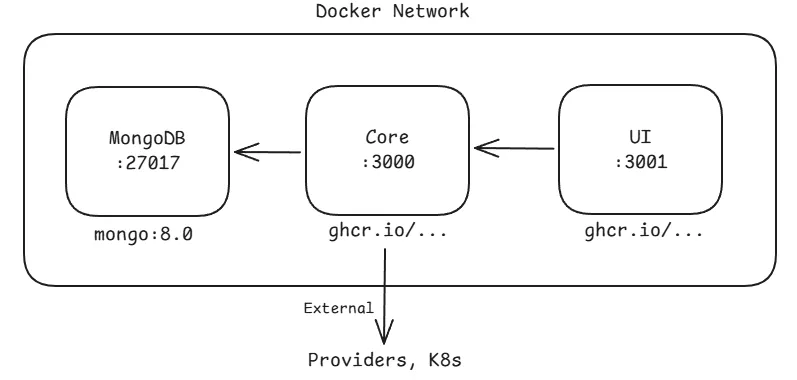
Production Mode
Section titled “Production Mode”When: orchcli init (no flags)
Compose file: docker-compose.prod.yml
All three services run inside Docker using pre-built images from GHCR.
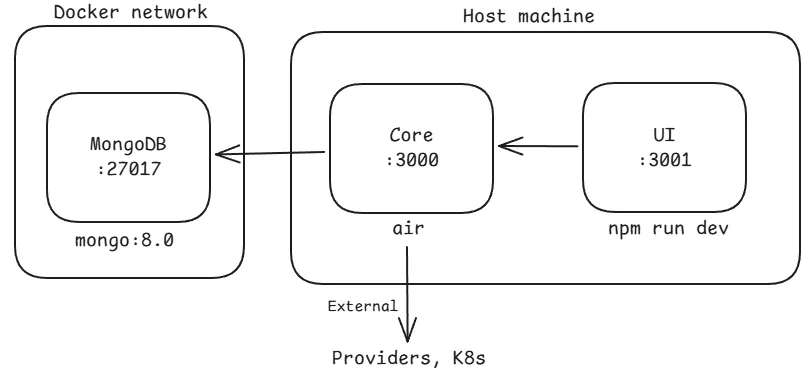
Full Development Mode
Section titled “Full Development Mode”When: orchcli init --fork-ui --fork-core
Compose file: docker-compose.dev.yml (MongoDB only)
Only MongoDB runs in Docker. UI and Core run on the host with hot reload.
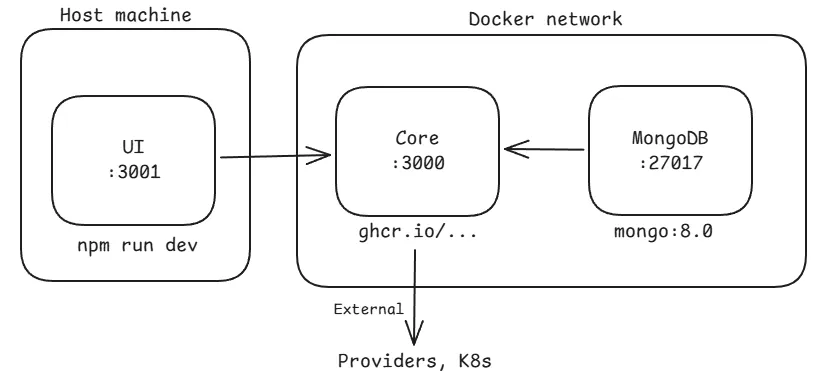
Frontend-Only Development
Section titled “Frontend-Only Development”When: orchcli init --fork-ui
Compose file: docker-compose.hybrid-ui.yml (MongoDB + Core in Docker)
UI runs on host, backend services in Docker. Frontend devs don’t need Go.
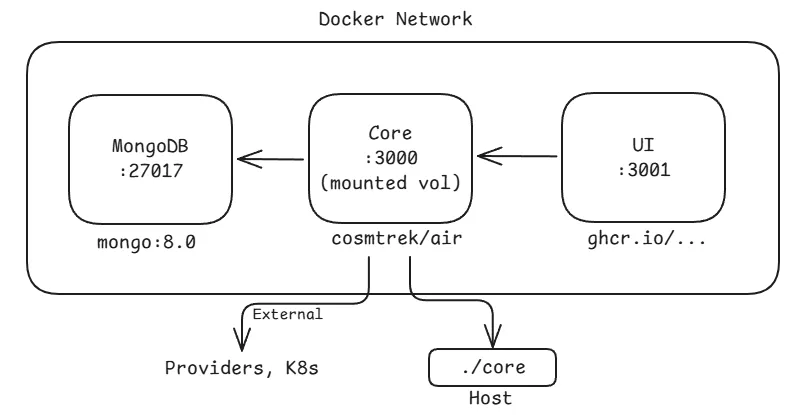
Backend-Only Development
Section titled “Backend-Only Development”When: orchcli init --fork-core
Compose file: docker-compose.hybrid-core.yml (all Docker, Core with mounted code)
Everything runs in Docker, but the Core source code is volume-mounted for hot reload via Air. Backend devs don’t need Go installed locally.
Configuration System
Section titled “Configuration System”OrchCLI stores project configuration in ~/.orchcli/orchcli-config.json (or next to the binary). The config tracks multiple projects and uses file locking (flock) for safe concurrent access.
{ "projects": { "/path/to/project": { "path": "/path/to/project", "ui_path": "/path/to/project/ui", "core_path": "/path/to/project/core", "mode": "development" } }, "current_project": "/path/to/project"}Modes: production, development, ui-dev, core-dev
The mode is auto-detected based on which repository paths are set and whether those directories exist on disk.
Concurrent Operations
Section titled “Concurrent Operations”OrchCLI runs independent operations in parallel for speed:
- Repository cloning — UI and Core repos cloned simultaneously
- Dependency installation —
npm installandgo mod downloadrun in parallel - Health checks — Multiple container checks run concurrently
Each concurrent task gets a progress indicator and errors are aggregated at the end.
Auto-Installation
Section titled “Auto-Installation”When --auto-install is enabled (default), OrchCLI automatically installs missing prerequisites:
| Dependency | Linux (Debian) | macOS |
|---|---|---|
| Git | apt-get install git | brew install git |
| Node.js/npm | NodeSource LTS | brew install node |
| Go | apt-get install golang-go | brew install go |
Docker/Docker Compose must be installed manually as they require system-level setup.