Data Flow
This page traces the data flow through the entire system for the most important user operations.
Workflow Creation and Deployment
Section titled “Workflow Creation and Deployment”This is the primary flow — a user creates a visual workflow and deploys it to Kubernetes.
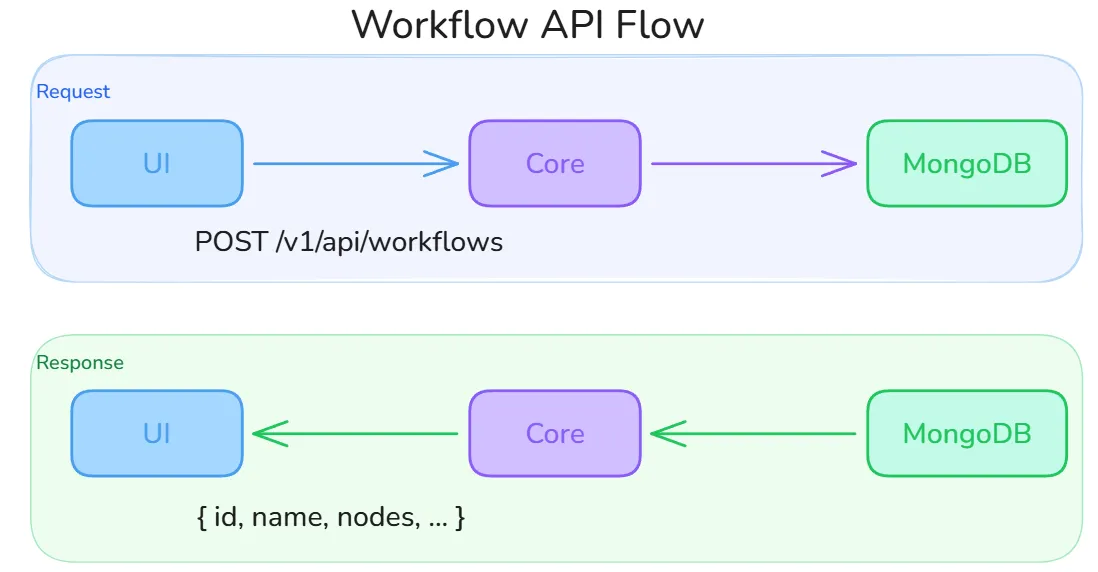
The diagram below shows the round-trip for a workflow API call. The UI sends a POST /v1/api/workflows request (body: name, description, cluster_id) and receives back the full workflow document including its generated id, empty nodes and edges arrays, and initial draft status. All subsequent saves call POST /v1/api/workflows/:id/save, which sanitizes node data and detects any nodes removed since the last save so their Kubernetes resources can be cleaned up.
Phase 1: Design
Section titled “Phase 1: Design”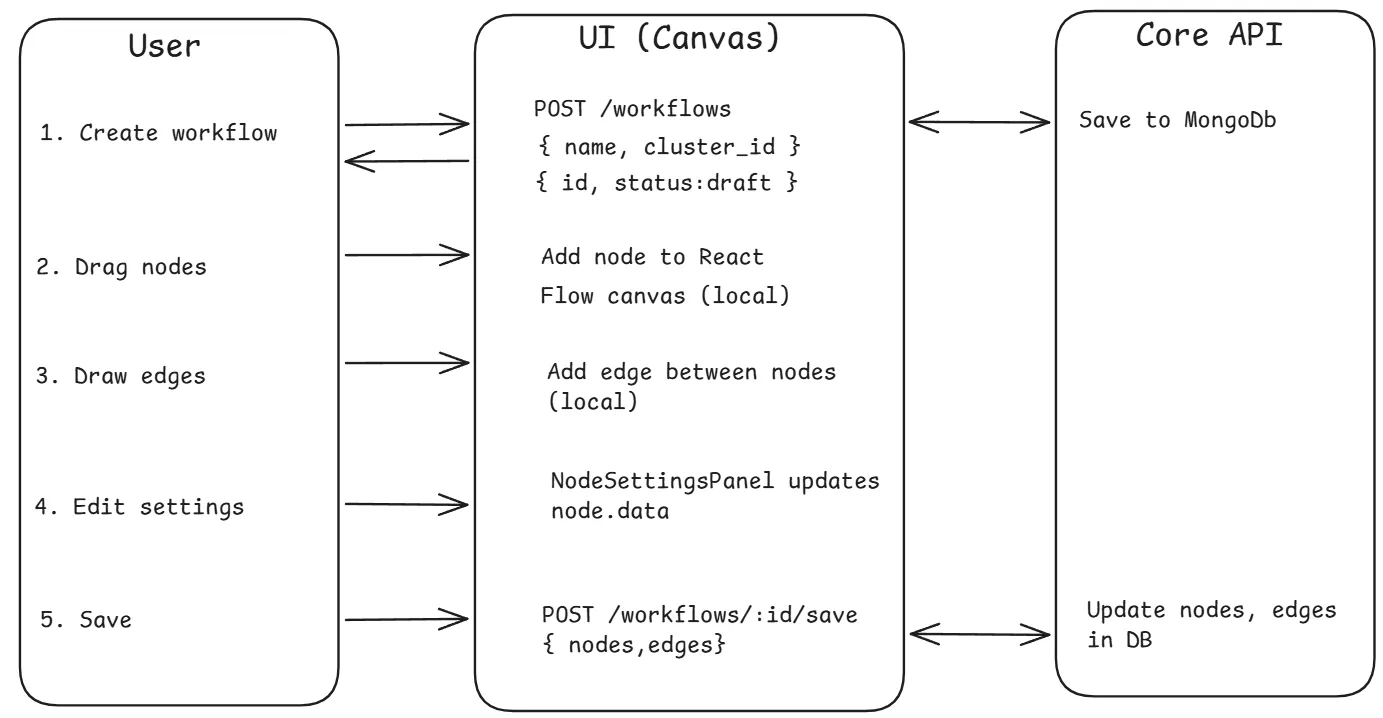
Phase 2: Deploy
Section titled “Phase 2: Deploy”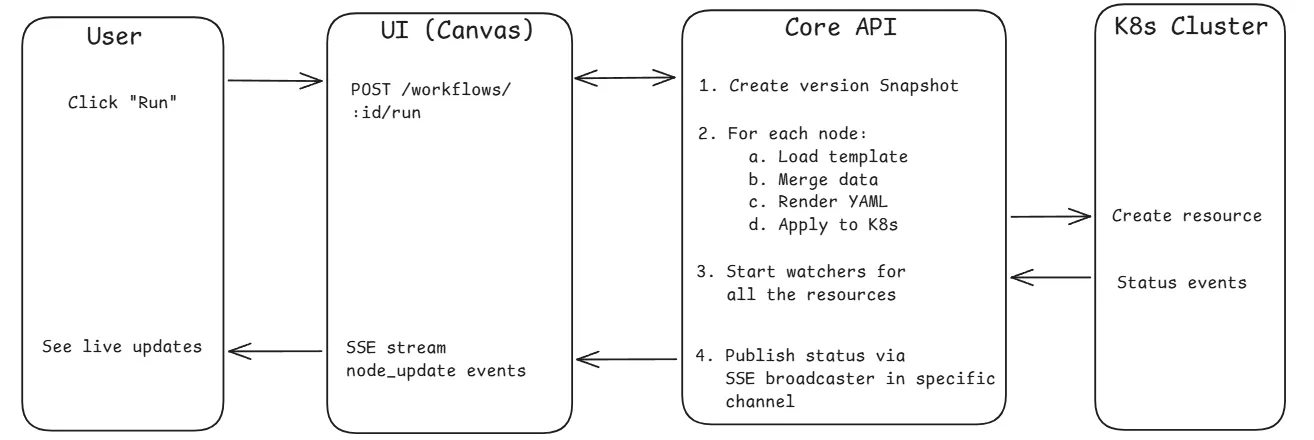
Node-to-Manifest Transformation
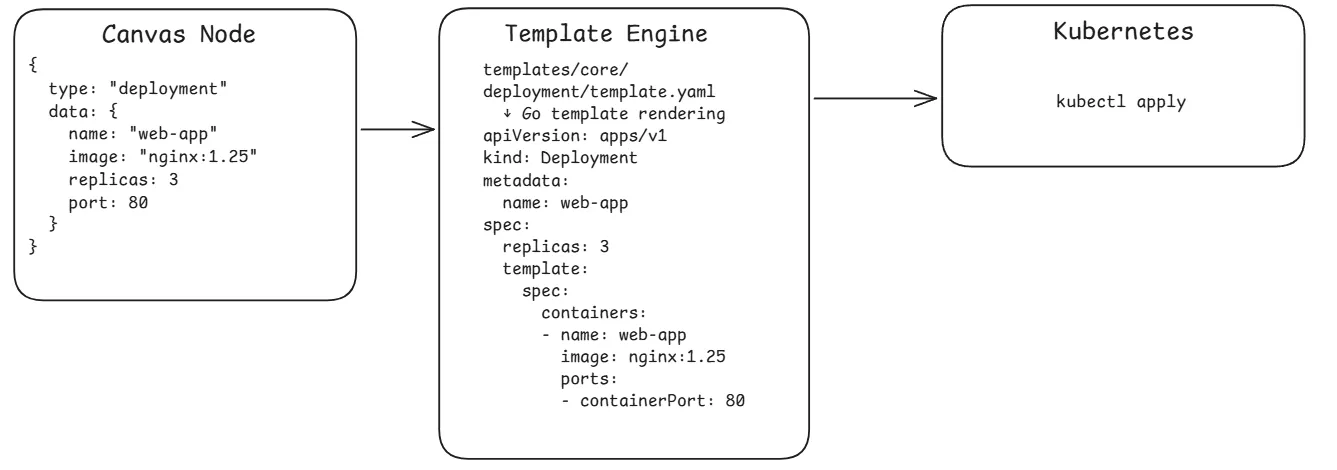
Section titled “Node-to-Manifest Transformation”Each visual node is converted to a Kubernetes manifest through the template system:
Docker Compose Import Flow
Section titled “Docker Compose Import Flow”Users can import existing Docker Compose files to auto-generate workflow nodes.
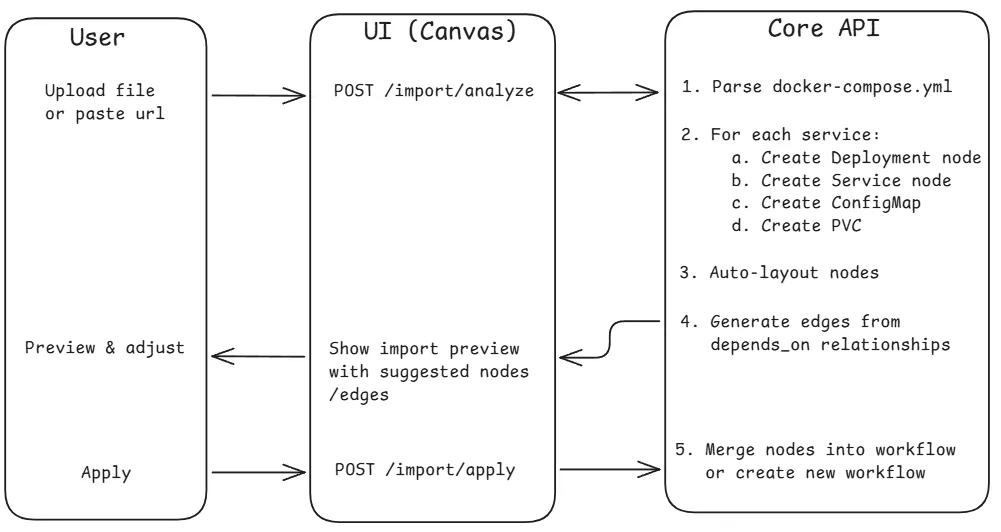
For Git repository imports, the flow includes an async step where the core clones the repo, detects the compose file, and streams progress via SSE.
Container Build Flow
Section titled “Container Build Flow”Users can build container images from Git repositories using Nixpacks.
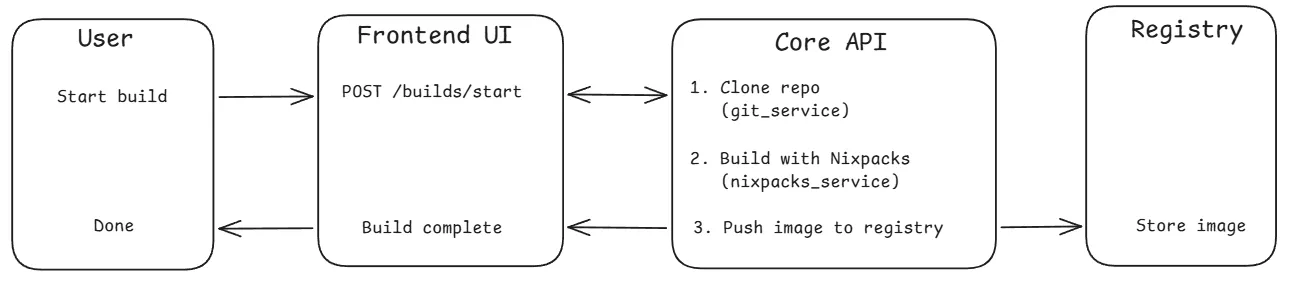
Build status progresses: pending → cloning → building → pushing → completed/failed
Authentication Flow
Section titled “Authentication Flow”Built-in Email/Password
Section titled “Built-in Email/Password”- User submits registration/login form
- Core validates input and hashes password (bcrypt, cost 12)
- If first user, automatically assigned admin role
- User saved to MongoDB, JWT generated (24h expiry)
- UI stores token in Zustand AuthStore (persisted to localStorage)
- All subsequent requests include
Authorization: Bearer <token> - Token refresh available via
POST /auth/refresh(max 7 days)
OAuth2/OIDC Flow
Section titled “OAuth2/OIDC Flow”- User clicks “Login with X” (GitHub, Authentik, etc.)
- Core generates a state parameter and redirects to the provider’s auth page
- User consents, provider redirects back to Core with an authorization code
- Core exchanges the code for an access token, then fetches user info from the provider
- Core creates or links the user account in MongoDB
- Core redirects to UI with a short-lived authorization code
- UI exchanges the code for a JWT via
POST /auth/oauth/exchange
Real-Time Resource Monitoring
Section titled “Real-Time Resource Monitoring”After deployment, the core maintains active watchers on Kubernetes resources:
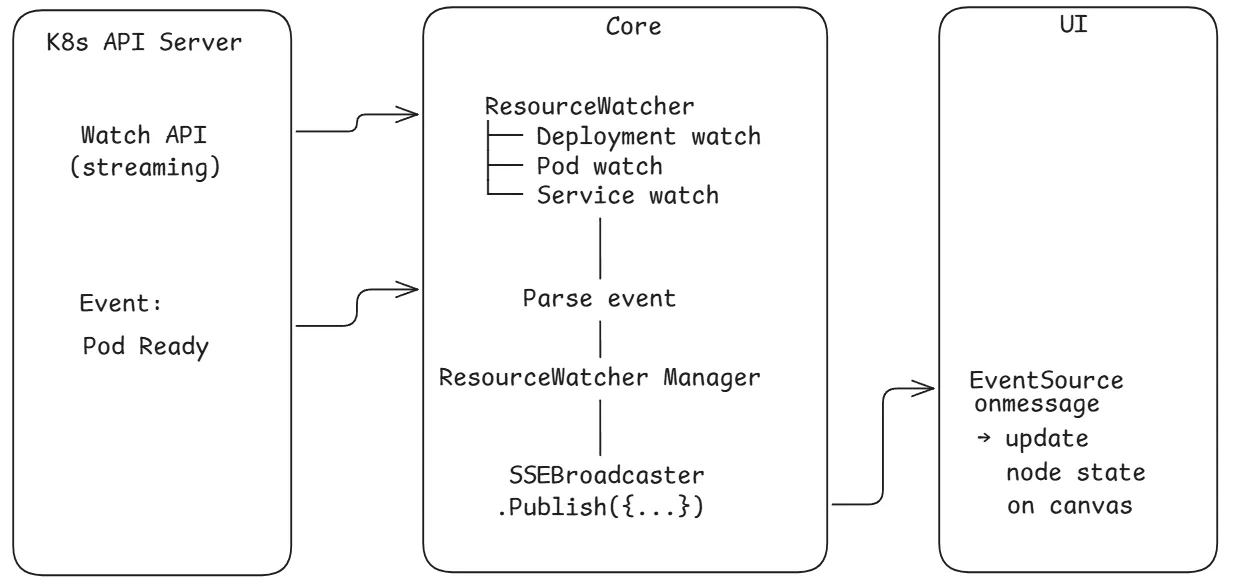
Resource Watch Pipeline
Section titled “Resource Watch Pipeline”When a workflow is run, the Core’s StreamWorkflowStatusHandler calls startWatchersForWorkflow, which creates a ResourceWatcher for every node in the workflow. Each watcher uses the Kubernetes dynamic client with a field selector targeting that specific resource by name and namespace.

The ResourceWatcher receives raw Kubernetes watch events and extracts a human-readable status using a type-specific extractor. For example, a Deployment watcher compares readyReplicas against the desired count, inspects ReplicaSet conditions, and surfaces pod-level failure messages. When the extracted status differs from the last known state, it:
- Updates the
workflow_runsdocument in MongoDB with the new node status - Publishes a
StreamEventto theSSEBroadcasteronworkflow:<id>andresource:<id>keys
If the K8s API server watch connection drops, the watcher retries with exponential backoff (5s initial, 60s cap).
SSE Status Stream
Section titled “SSE Status Stream”The UI opens a persistent SSE connection to GET /v1/api/workflows/:id/status/stream using fetch() with an Authorization: Bearer header (native EventSource is not used because it cannot send custom headers).
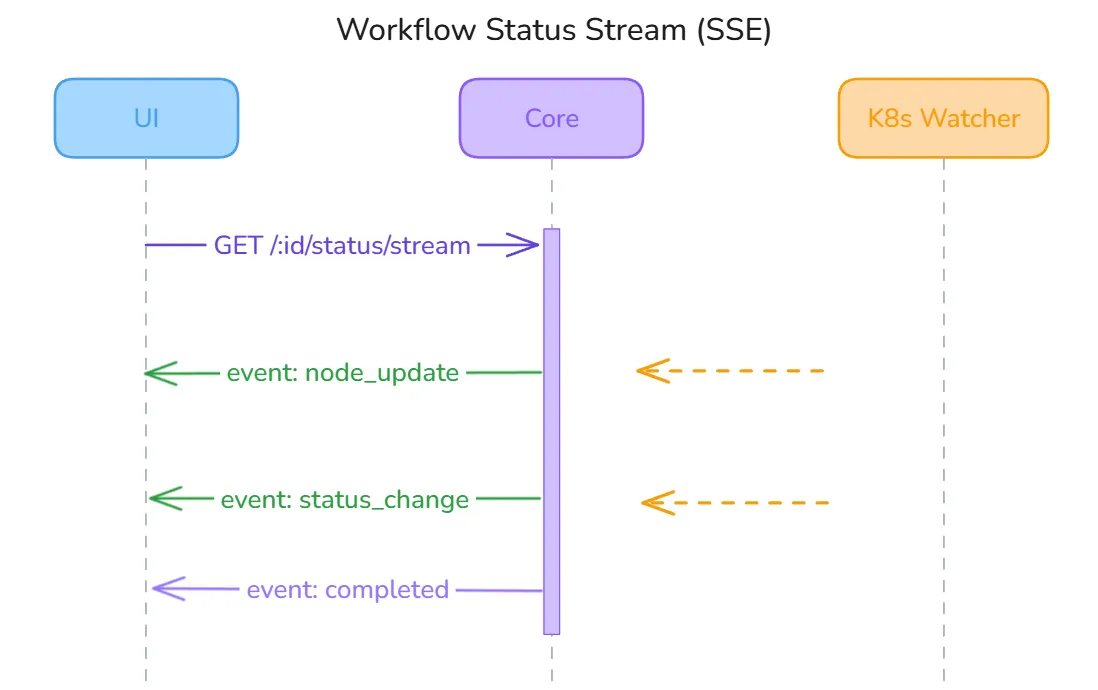
The Core’s handler subscribes to the SSEBroadcaster under the workflow:<id> key and flushes events to the response writer. The broadcaster does a non-blocking fan-out — events are dropped for slow clients rather than blocking other subscribers. The UI useWorkflowStatusStream hook handles five event types:
| Event | Action |
|---|---|
metadata | Confirms stream is live, hydrates initial node statuses |
node_update | Updates a specific node’s status on the canvas |
workflow_sync | Syncs the full workflow state (used after reconnect) |
error | Surfaces error message for the affected node |
complete | Marks the workflow run as finished |
A global activeConnections Set prevents duplicate connections from React StrictMode double-mounts. On disconnect, the hook auto-reconnects after 3 seconds.
Terminal Exec Session
Section titled “Terminal Exec Session”Terminal access to pods uses a WebSocket connection for full-duplex stdin/stdout/stderr communication. The UI connects via GET /v1/api/resources/:id/exec/terminal?shell=bash&token=<jwt>.
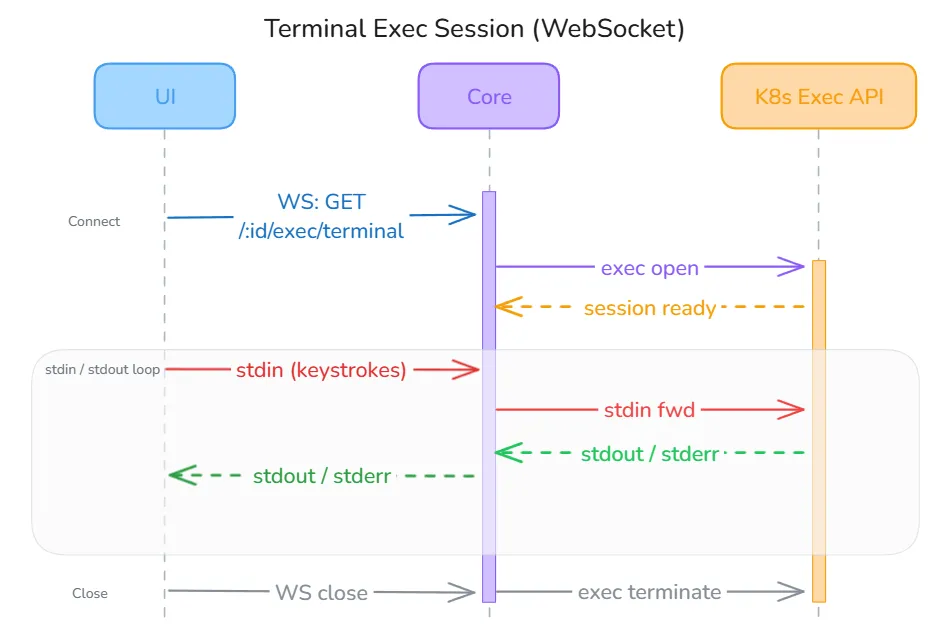
The JWT is passed as a URL query parameter because browsers do not allow custom headers on WebSocket upgrades — this is a documented limitation with a planned fix to use a short-lived server-issued ticket instead. Once the handshake completes, the Core proxies the connection directly to the Kubernetes Exec API using client-go’s SPDY executor. The useTerminal hook in the UI handles four server message types: metadata (session ready), output (terminal bytes to display), error (session-level failure), and close (session ended by server or pod exit).
Version Control Flow
Section titled “Version Control Flow”Every time a workflow is run, the Core automatically increments the version counter and writes a complete snapshot of the current nodes and edges arrays into the workflow_versions collection. This happens atomically before the executor starts, so every deployment is always traceable to an exact version.
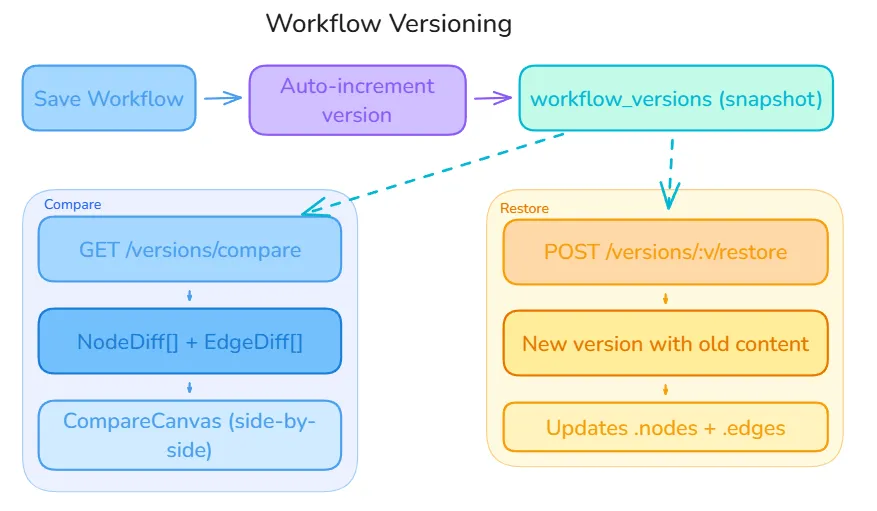
Each version snapshot contains the full node graph — not a delta — which keeps reads fast and avoids replay chains. Two operations branch off from any stored snapshot:
Compare (GET /v1/api/workflows/:id/versions/compare?v1=1&v2=3) — The Core loads both version snapshots and computes a NodeDiff[] and EdgeDiff[] by comparing node IDs, types, and data fields. The UI renders this in a side-by-side CompareCanvas, highlighting added nodes in green, removed nodes in red, and changed nodes in amber.
Restore (POST /v1/api/workflows/:id/versions/:v/restore) — Rather than overwriting the current workflow, the Core creates a new version whose content is a copy of the selected historical snapshot, then updates the live workflow.nodes and workflow.edges. This means the version history is always append-only and a restore can itself be undone.