Ecosystem Overview
KubeOrch is a three-repo platform: a Go backend (core), a Next.js frontend (ui), and a developer CLI (cli), connected via REST APIs and Server-Sent Events (SSE) for real-time updates. The CLI orchestrates the local development environment using Docker Compose.
System Architecture
Section titled “System Architecture”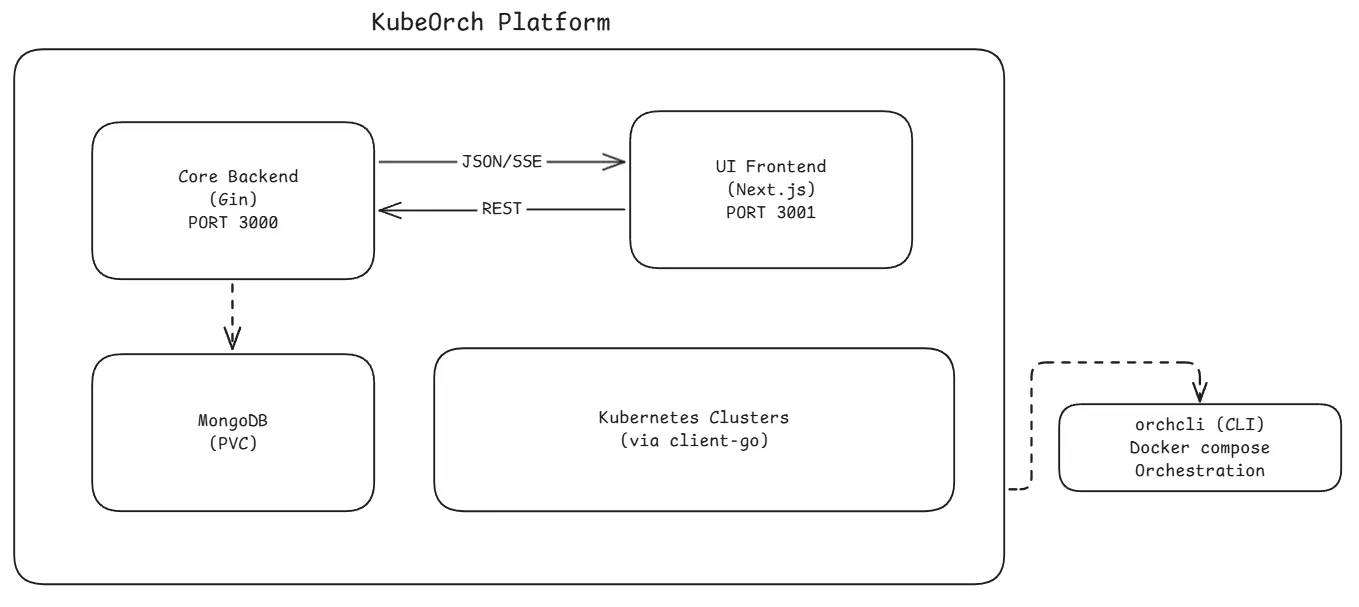
Component Responsibilities
Section titled “Component Responsibilities”Core Backend (Go)
Section titled “Core Backend (Go)”The backend is the brain of the platform. It:
- Serves the REST API on port 3000 under the
/v1prefix - Manages Kubernetes clusters — stores encrypted credentials, tests connections, monitors health
- Executes workflows — converts visual node graphs into Kubernetes manifests and applies them via
client-go - Handles authentication — JWT-based auth with support for OAuth2/OIDC providers (GitHub, Authentik, etc.)
- Streams real-time data — SSE broadcaster for workflow status, pod logs, resource status, build progress, and import progress
- Builds container images — integrates with Nixpacks for source-to-image builds
- Imports projects — parses Docker Compose files and Git repos into workflow node graphs
- Manages templates — provides pre-configured resource templates for the component palette
- Handles plugins — CRD-based extensible plugin system for custom resource types
UI Frontend (Next.js)
Section titled “UI Frontend (Next.js)”The frontend provides the user experience. It:
- Visual Workflow Canvas — React Flow-based drag-and-drop editor with 15+ node types
- State Management — Zustand stores for auth, workflows, clusters, resources, plugins, and registries
- API Client — Axios-based client with automatic JWT refresh and 401 redirect handling
- Real-Time Streaming — SSE/EventSource hooks for live workflow status, pod logs, and build progress
- Dashboard — Overview with stats, recent workflows, and cluster status
- Settings & Admin — Cluster management, registry configuration, user profiles
CLI (orchcli)
Section titled “CLI (orchcli)”The CLI is the developer experience layer. It:
- Initializes projects — clones UI/Core repos (or forks), installs dependencies concurrently
- Manages Docker Compose — auto-selects the right compose file based on which repos are cloned locally
- Supports 4 development modes — production (all Docker), full dev (both local), frontend-only, backend-only
- Provides service management — start, stop, restart, logs, status, exec, and debug commands
- Handles fork workflows — auto-configures upstream remotes for external contributors
- Auto-installs dependencies — detects and installs Git, Node.js, and Go when needed
Data Layer (MongoDB)
Section titled “Data Layer (MongoDB)”MongoDB stores all persistent data across these collections:
| Collection | Purpose |
|---|---|
users | User accounts, roles, OAuth provider links |
workflows | Workflow definitions with nodes, edges, and metadata |
workflow_versions | Version history for workflows (separate collection for scalability) |
workflow_runs | Execution history and logs for each workflow run |
oauth_states | Temporary OAuth flow state (TTL: 10 min) |
oauth_codes | Temporary OAuth authorization codes (TTL: 30 sec) |
dashboard_stats | Pre-computed dashboard statistics |
Additional data is stored in MongoDB via repository patterns:
- Clusters, resources, registries, plugins, builds, and import sessions
Communication Patterns
Section titled “Communication Patterns”REST API (Request-Response)
Section titled “REST API (Request-Response)”All CRUD operations use standard REST over HTTP. Every route lives under the /v1 prefix and requires a Authorization: Bearer <token> header except for auth endpoints.
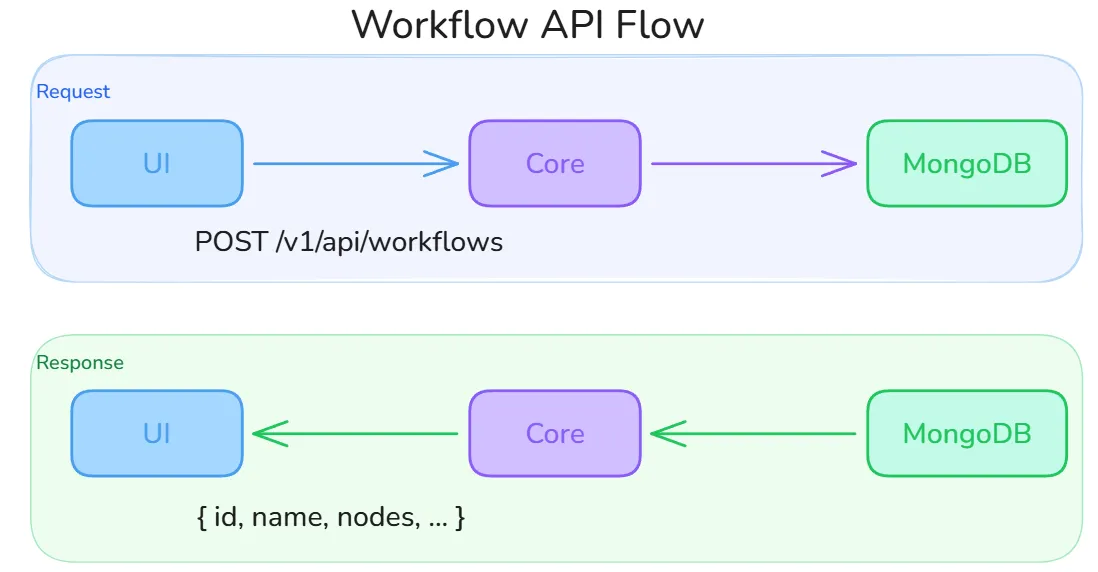
The diagram above shows the lifecycle of a typical workflow operation: the UI sends a request (e.g., POST /v1/api/workflows with name, description, and cluster_id), the Core handler validates ownership and input, performs the operation against MongoDB, and returns the full document. All API calls in the UI go through a centralized Axios instance (lib/api.ts) that automatically injects the JWT, handles transparent token refresh via a shared promise (preventing concurrent refresh races), and redirects to /login on a 401.
SSE (Server-Sent Events)
Section titled “SSE (Server-Sent Events)”Real-time updates are pushed to the UI using Server-Sent Events. The Core maintains a singleton SSEBroadcaster (initialized once via sync.Once) that maps stream keys to slices of subscriber channels:
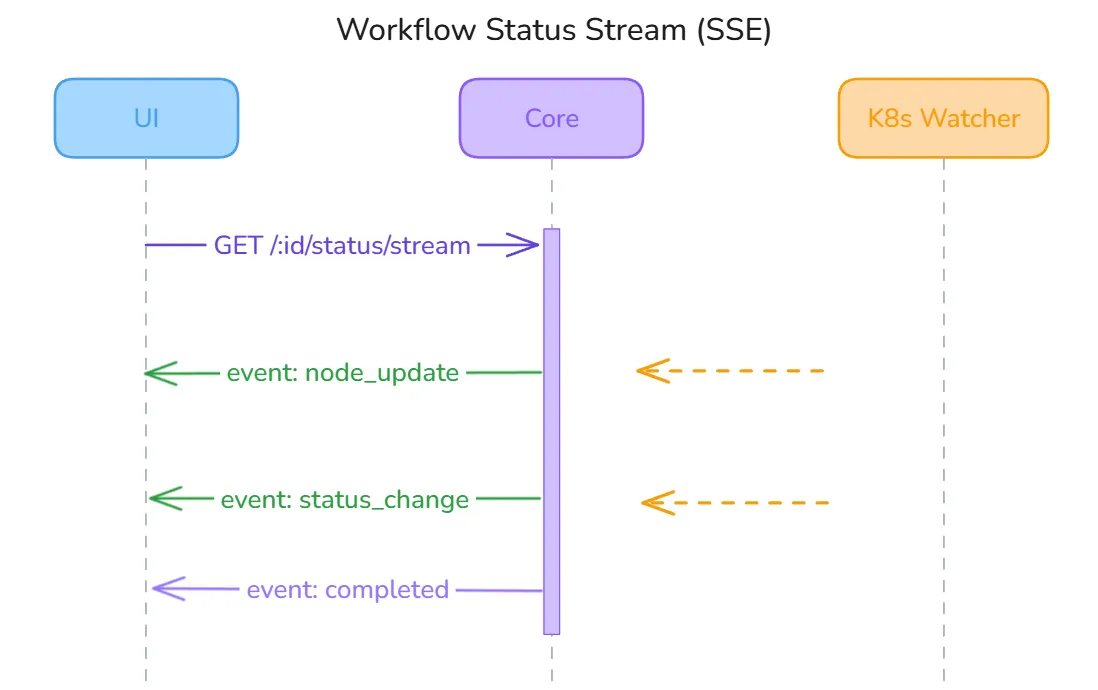
How it works end-to-end:
- The UI opens a long-lived HTTP connection using
fetch()with anAuthorization: Bearerheader. NativeEventSourceis intentionally avoided because it does not support custom headers. - The Core’s SSE handler subscribes to the broadcaster under the relevant stream key (e.g.,
workflow:<id>) and begins flushing events as they arrive. - The
SSEBroadcasterfans events out non-blocking — if a subscriber’s channel buffer is full (slow client), the event is dropped and a warning is logged rather than blocking other subscribers. - The UI hook (
useWorkflowStatusStream) parses incoming events by type —metadata,node_update,workflow_sync,error, andcomplete— and updates local React state. A globalactiveConnectionsSet prevents duplicate streams from React StrictMode double-mounts. - On disconnect, the hook schedules a reconnect after 3 seconds.
Active stream key namespaces:
| Stream key | Purpose |
|---|---|
workflow:<id> | Node-level status during workflow execution |
pod-logs:<id> | Live container log streaming from a running pod |
resource:<id> | Kubernetes resource health changes |
build:<id> | Container image build progress (clone → build → push) |
import:<id> | Docker Compose / Git import analysis progress |
WebSocket
Section titled “WebSocket”Terminal access to running pods uses a WebSocket connection for full bidirectional communication (stdin/stdout/stderr):
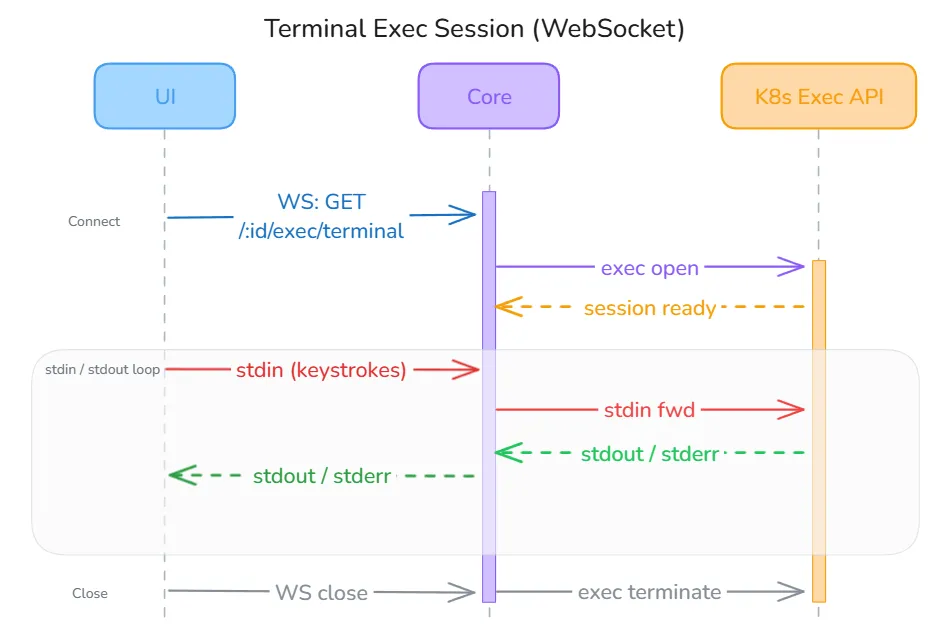
The UI connects to GET /v1/api/resources/:id/exec/terminal?shell=bash&token=<jwt>. The JWT is passed as a URL query parameter because browser WebSocket APIs do not support custom headers — this is a known limitation documented in the codebase with a TODO to implement a short-lived ticket exchange on the backend for improved security. Once connected, the Core proxies input and output directly to the Kubernetes Exec API (client-go). The UI hook (useTerminal) handles four message types: metadata (connection confirmed), output (terminal data), error (session error), and close (session ended), and auto-reconnects unless the session was intentionally closed.
Authentication Flow
Section titled “Authentication Flow”1. User ── POST /auth/login ──► Core2. Core validates credentials against MongoDB3. Core ◄── returns JWT token (24h expiry)4. UI stores token in localStorage (Zustand persist)5. All subsequent requests include: Authorization: Bearer <token>6. Token refresh: POST /auth/refresh (max 7 days)OAuth2/OIDC flow:
1. UI ── GET /auth/oauth/:provider/authorize ──► Core ──► Provider2. Provider ──► callback to Core ──► exchanges code for user info3. Core creates/links user account, generates JWT4. Core redirects to UI with authorization code5. UI ── POST /auth/oauth/exchange ──► Core ──► returns JWTKubernetes Integration
Section titled “Kubernetes Integration”The core backend connects to Kubernetes clusters using client-go. Each cluster connection supports 5 authentication methods:
- KubeConfig — Standard kubectl configuration file
- Bearer Token — Direct token authentication
- Client Certificate — Mutual TLS with X.509 certificates
- Service Account — Namespace-scoped service account tokens
- OIDC — OpenID Connect via external identity providers
All credentials are encrypted at rest using AES-256-GCM before storage in MongoDB.
Resource Watchers
Section titled “Resource Watchers”After a workflow is deployed, the Core starts a ResourceWatcher for each Kubernetes resource. Watchers use the dynamic client-go client with field-selector scoping so they only receive events for the specific resource they own.

The pipeline works as follows:
- K8s API Server streams watch events (ADDED, MODIFIED, DELETED) to the
ResourceWatcherfor one of 14 supported resource types (Deployment, Service, StatefulSet, DaemonSet, Job, CronJob, Ingress, ConfigMap, Secret, PVC, Pod, ReplicaSet, HPA, NetworkPolicy). - ResourceWatcher extracts a meaningful status using a per-type extractor (e.g., for a Deployment: compares
readyReplicasvsreplicasand surfaces any pod-level failure conditions). If the status has changed, it writes the new state to MongoDB. - SSEBroadcaster receives the publish event and fans it out to all currently subscribed UI clients on the
workflow:<id>andresource:<id>stream keys. - UI receives the
node_updateorstatus_changeevent and updates the canvas node appearance in real time.
Watchers implement exponential backoff reconnection (5s base, 60s max) so transient API server disruptions self-heal. The ResourceWatcherManager singleton tracks all active watchers and stops them cleanly on workflow archive or server shutdown.
Health Monitoring
Section titled “Health Monitoring”A background ClusterHealthMonitor runs every 60 seconds. It iterates all registered clusters, attempts a lightweight API server ping using the stored (decrypted) credentials, and writes the result (connected / error) back to MongoDB. The UI reflects this status in the cluster selector and on the dashboard without any manual refresh.