Development Modes
OrchCLI automatically selects the correct Docker Compose file based on which repositories are cloned locally. This is the core architectural concept — the operating mode is not a configuration flag but a runtime consequence of what exists on disk.
Production Mode
Section titled “Production Mode”When: orchcli init (no flags)
Compose file: docker-compose.prod.yml
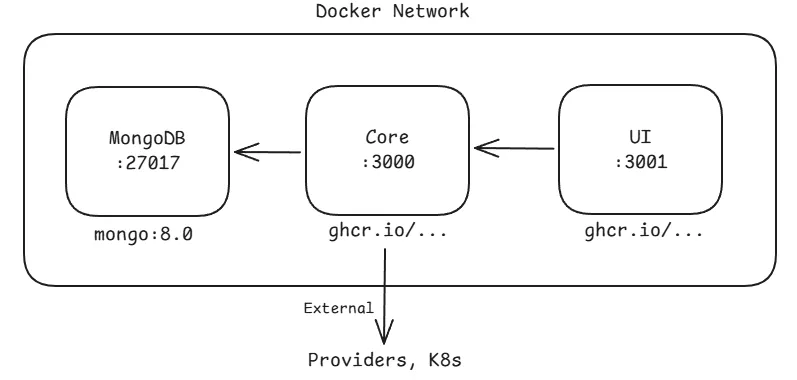
All three services run inside Docker using pre-built images from GHCR. This mode requires only Docker on the host and is intended for users who want to run the KubeOrch platform locally without contributing code. No source code is present on the host and no language runtimes are needed.
The images used are:
ghcr.io/kubeorch/ui:latestghcr.io/kubeorch/core:latest- MongoDB 8.0 (official image)
Full Development Mode
Section titled “Full Development Mode”When: orchcli init --fork-ui --fork-core
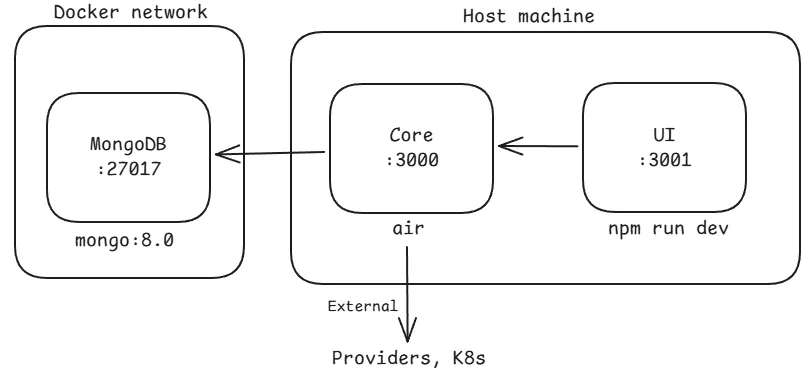
Compose file: docker-compose.dev.yml (MongoDB only)
Only MongoDB runs in Docker. The UI development server and the Core API process both run directly on the host machine. This mode is intended for contributors who are actively working on both the frontend and backend simultaneously. Both Node.js and Go must be installed on the host. Hot reload works natively since both processes run as standard host processes with their own file watchers.
Frontend-Only Development
Section titled “Frontend-Only Development”When: orchcli init --fork-ui
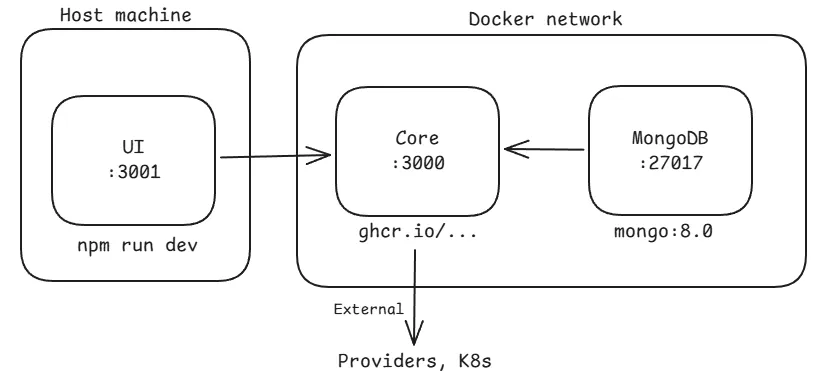
Compose file: docker-compose.hybrid-ui.yml (MongoDB + Core in Docker)
The UI development server runs on the host while Core and MongoDB run inside Docker. This mode is designed for frontend contributors who need to iterate on the UI but do not need to modify or understand the Go backend. Go does not need to be installed. The Core container serves a stable API endpoint that the host-side Vite or Next.js dev server can proxy to.
Backend-Only Development
Section titled “Backend-Only Development”When: orchcli init --fork-core
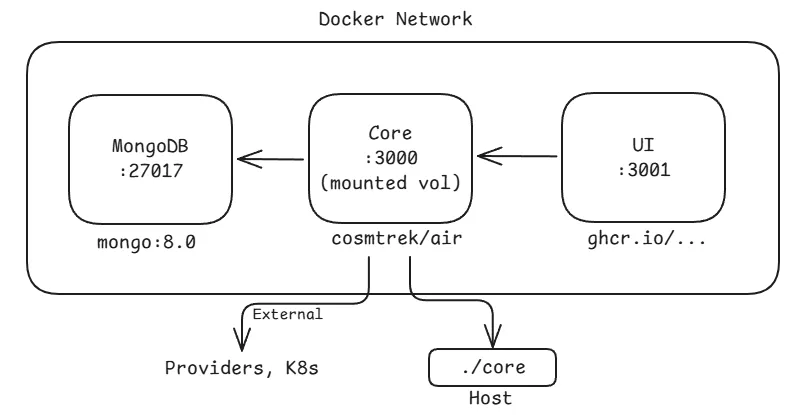
Compose file: docker-compose.hybrid-core.yml (all Docker, Core with mounted code)
All services run in Docker, but the Core source code directory is volume-mounted into the Core container. Inside the container, Air watches for file changes and automatically recompiles and restarts the Go process. This gives hot reload behavior without requiring Go to be installed on the host. Backend contributors can edit .go files in their IDE and see changes take effect in the container automatically. The UI is served from the GHCR image.