Workflow Canvas
The canvas is the centerpiece of the application, built on React Flow. WorkflowCanvas.tsx is the root component that wires together the React Flow instance, all node and edge type registrations, the settings panel, the command palette, and the mini logs panel.
Canvas Structure
Section titled “Canvas Structure”WorkflowCanvas.tsx ├── React Flow Provider │ ├── Node Types Registry (15+ types) │ │ ├── DeploymentNode │ │ ├── ServiceNode │ │ ├── IngressNode (multi-handle for paths) │ │ ├── ConfigMapNode │ │ ├── SecretNode │ │ ├── StatefulSetNode │ │ ├── JobNode / CronJobNode │ │ ├── DaemonSetNode │ │ ├── HPANode │ │ ├── NetworkPolicyNode │ │ ├── PersistentVolumeClaimNode │ │ └── GenericPluginNode │ │ │ ├── Edge Connection Handler │ │ └── Auto-links resources (e.g., Service → Deployment, Ingress → Service) │ │ │ ├── Controls + Background + MiniMap │ └── Auto-save (debounced) │ ├── CommandPalette (Cmd+K) │ └── Quick-add any resource type with search │ ├── NodeSettingsPanel (right sidebar) │ └── Per-type settings editors │ └── MiniLogsPanel (bottom panel) └── Real-time execution logsCanvas Internals
Section titled “Canvas Internals”WorkflowCanvas.tsx manages React Flow state with the useNodesState and useEdgesState hooks, which provide the nodes and edges arrays along with their corresponding setters.
nodeTypes registration. The nodeTypes constant mapping resource type strings to React components is wrapped in useMemo. This is required by React Flow — if nodeTypes is defined as a plain object outside of a stable reference, React Flow logs warnings and re-registers every node type on every render, causing unnecessary re-mounts of all nodes on the canvas.
edgeTypes. Custom edge styles are registered via an edgeTypes constant (also memoized), allowing the canvas to render styled connection lines that reflect the relationship between resource kinds.
Background. The canvas uses React Flow’s Background component with BackgroundVariant to render the dot-grid background that is standard across the application.
addEdge handler. When a user drags a connection between two node handles, the onConnect callback calls React Flow’s addEdge utility to append the new edge to the edges state. The handler also validates that the connection makes semantic sense (e.g., an Ingress should connect to a Service, not directly to a Deployment) before committing the edge.
Debounced auto-save. Changes to the canvas — node moves, new connections, or settings edits — trigger an auto-save using lodash-es debounce. The debounced function calls POST /:id/save with the current nodes and edges serialized as JSON. This prevents saving on every keystroke or pixel of drag movement while still persisting the canvas state automatically during editing. The workflow’s status lifecycle (draft → published → archived) is managed separately: only published workflows can be run, and the status transition is an explicit user action, not part of auto-save.
Node Type Registry
Section titled “Node Type Registry”All 13 concrete node types are registered in the nodeTypes map. Each corresponds to a Kubernetes resource kind and carries a typed data object defined in lib/types/nodes.ts:
| Node Type | Notable Characteristic |
|---|---|
DeploymentNode | Displays replica count and live readiness status from the status stream |
ServiceNode | Shows service type (ClusterIP / NodePort / LoadBalancer) and renders the assigned clusterIP and externalIP when available |
IngressNode | Exposes multiple source handles, one per routing rule, allowing individual path rules to connect to different Services |
ConfigMapNode | Renders a key count badge; keys are editable inline via the settings panel without leaving the canvas |
SecretNode | Key names are displayed but values are masked in the UI and never written to persistent storage |
PersistentVolumeClaimNode | Shows access mode and storage size; links to StatefulSets and Deployments that claim the volume |
StatefulSetNode | Includes a volumeClaimTemplates field for per-replica PVC definitions, distinct from the top-level PVC node |
JobNode | One-shot execution; settings include completions, parallelism, and backoffLimit |
CronJobNode | Wraps a JobNode definition with a schedule (cron expression) and concurrencyPolicy |
DaemonSetNode | Deployed to every eligible node in the cluster; settings include node selectors and tolerations |
HPANode | References a target Deployment or StatefulSet by name; configures minReplicas, maxReplicas, and CPU/memory metrics |
NetworkPolicyNode | Defines ingress and egress rules with pod and namespace selectors; rendered with dashed borders to indicate policy scope |
GenericPluginNode | Dynamically rendered from the plugin definition fetched from PluginStore; fields, handles, and icons are all determined at runtime from the plugin manifest |
Node Data Flow
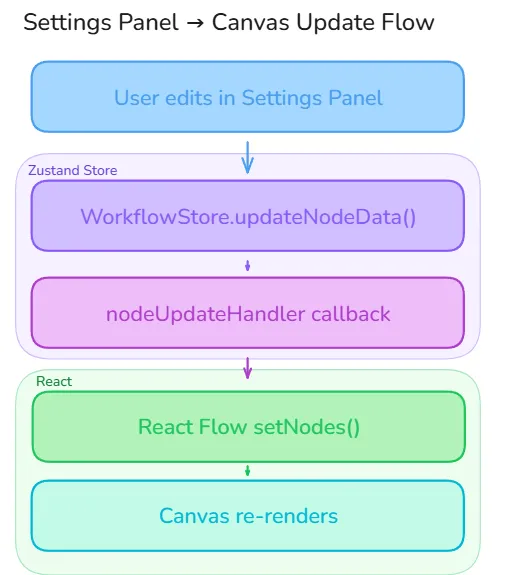
Section titled “Node Data Flow”Each node on the canvas has a data property matching a typed interface defined in lib/types/nodes.ts (e.g., DeploymentNodeData, ServiceNodeData). The settings panel never writes to React Flow directly — instead it calls WorkflowStore.updateNodeData(), which invokes a nodeUpdateHandler callback that was registered by the canvas on mount. This callback-delegation pattern keeps the settings panel decoupled from React Flow’s internal state.
The WorkflowStore also holds two runtime-only maps — secretValues and envValues — keyed by node ID. These are never persisted to the database or included in version snapshots; they exist only in memory for the duration of the session and are passed directly to the Core at deploy time. Sensitive values (e.g., DB_PASSWORD) are therefore never written to MongoDB — only the key names are stored.
Secret Handling
Section titled “Secret Handling”Secret values are never persisted to the database. Only key names are stored. Values live transiently in the WorkflowStore.secretValues map and are passed directly to Kubernetes at deploy time:
DB stores: { keys: [{ id, name: "DB_PASSWORD" }] }Runtime only: WorkflowStore.secretValues["node-1"]["DB_PASSWORD"] = "actual-value"Deploy time: Values sent in run request → Core → K8s Secret